Mastering Day 1: What, Why & How
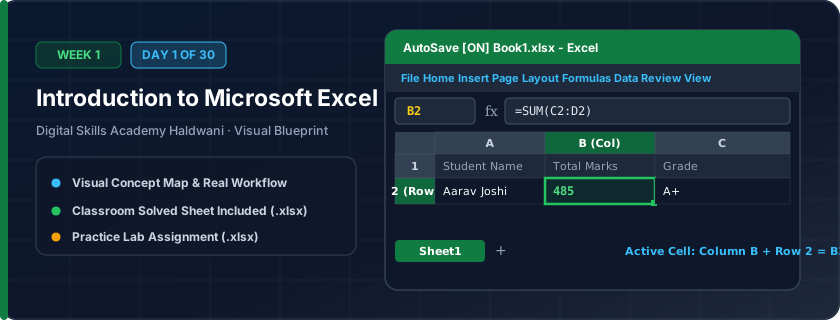
An electronic spreadsheet grid made of columns (letters A to XFD) and rows (numbers 1 to 1,048,576). Think of it as infinite digital graph paper where every single box (cell) has a unique GPS address and can perform lightning-fast math.
In manual paper registers or Word documents, changing a single bill amount means recalculating everything by hand with a pocket calculator. In Excel, when one number changes, every related total, tax, and chart updates in less than a second.
"Columns are Letters (like street names), Rows are Numbers (like house numbers). Cell C5 is House 5 on Street C! Never use Excel like a typewriter — it's an active calculator."
What You Will Master Today
- Understanding the anatomy of an Excel workbook vs. worksheet
- Navigating the Ribbon tabs: Home, Insert, Page Layout, Formulas, Data
- Formula Bar, Name Box, Active Cell indicator, and Status Bar
- Columns (letters A to XFD), Rows (numbers 1 to 1,048,576), and Cell addresses
Step-by-Step Practical Walkthrough
Open Microsoft Excel and explore the Blank Workbook template.
Observe the Name Box (top left) which indicates your active cell reference (e.g., A1).
Locate the Quick Access Toolbar at the top left to customize 1-click Save and Undo buttons.
Practice moving through the grid using arrow keys, Page Up/Down, and Ctrl + Home.
Haldwani Local Grocery Store - Weekly Inventory Ledger Setup
Study the completed reference worksheet below. Every column illustrates the standard formatting, formula structure, and alignment applied by professional office operators.
| Item Code | Product Name | Department | Unit Price (₹) | Stock In Hand |
|---|---|---|---|---|
| GRO-101 | Basmati Rice 5kg | Grains & Pulses | ₹450.00 | 40 |
| GRO-102 | Mustard Oil 1L | Oils & Ghee | ₹165.00 | 60 |
| GRO-103 | Chana Dal 1kg | Grains & Pulses | ₹95.00 | 80 |
| GRO-104 | Tata Tea Gold 500g | Beverages | ₹310.00 | 35 |
| GRO-105 | Refined Sugar 5kg | Staples | ₹220.00 | 50 |
Personal Monthly Expense Tracker Layout Setup
- Task 1: Enter the raw data into columns A through E starting at row 4.
- Task 2: Apply bold formatting to header row 4 and adjust column widths so no text is truncated.
- Task 3: Save the workbook as 'Day01_Personal_Expenses.xlsx' using shortcut Ctrl + S.
- Task 4: Use Ctrl + Home to return to cell A1.
Exercise Data Template Preview: Download the .xlsx file below and execute each task independently.
| Expense ID | Expense Category | Payment Mode | Estimated Budget (₹) | Actual Spent (₹) |
|---|---|---|---|---|
| EXP-001 | House Rent | Bank Transfer | 8500 | |
| EXP-002 | Electricity Bill | UPI / GooglePay | 1800 | |
| EXP-003 | Grocery Supplies | Cash / Debit Card | 6500 | |
| EXP-004 | Internet & Mobile | UPI | 999 | |
| EXP-005 | Transportation / Fuel | Cash | 2500 |
Always save your new workbook immediately after creating it to enable Excel AutoRecover.
Need 1-on-1 Guidance on Day 1?
Join our hands-on classroom lab sessions at Digital Skills Academy in Haldwani. Every student receives a dedicated PC workstation, live instructor reviews, and interview prep.