Mastering Day 4: What, Why & How
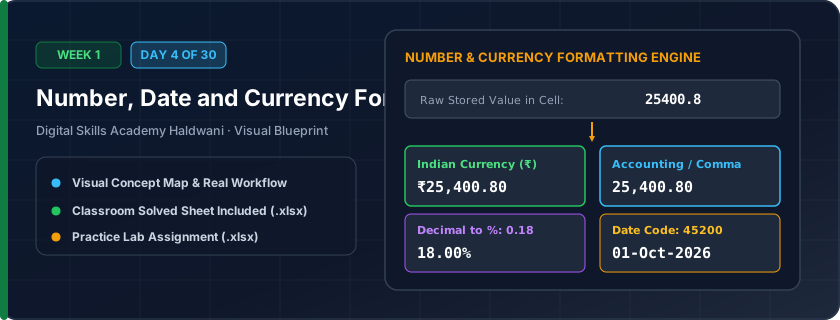
Controlling how values display to humans without altering the true underlying number stored in Excel's brain (e.g., typing 500 and displaying it as ₹500.00, or typing 0.18 and displaying 18%).
Typing currency symbols like '₹' or '$' manually with your keyboard converts your number into text, breaking all arithmetic formulas. Proper number formatting keeps numbers pure while displaying commas and currency symbols beautifully.
"Never type currency symbols manually! Let Excel dress the number in format clothes while keeping the raw math pure."
What You Will Master Today
- Difference between cell display value vs underlying actual stored value
- Number formatting: Decimal precision, 1000 separator commas (₹1,50,000)
- Currency (₹) vs Accounting formats (accounting aligns currency symbols to left)
- Date formats: DD-MM-YYYY vs DD/MM/YYYY vs Long Date (04 October 2026)
Step-by-Step Practical Walkthrough
Select numeric cells and press Ctrl + 1 to open the Format Cells dialog.
Under Category, choose 'Currency', select Symbol '₹ (English - India)', and set 2 decimal places.
Select date cells and choose 'Date' > 'DD-MM-YYYY' format.
Use the 'Increase Decimal' and 'Decrease Decimal' buttons on Home tab ribbon.
Haldwani Mobile & Electronics - Customer Invoice Ledger
Study the completed reference worksheet below. Every column illustrates the standard formatting, formula structure, and alignment applied by professional office operators.
| Invoice No | Bill Date | Customer Name | Device Model | MRP Rate (₹) | Discount % | Net Payable (₹) |
|---|---|---|---|---|---|---|
| INV-8801 | 2026-10-01 | Rohit Rawat | OnePlus Nord CE 4 (128GB) | ₹24,999.00 | 8.0% | ₹22,999.08 |
| INV-8802 | 2026-10-02 | Pooja Bisht | Samsung Galaxy S24 (256GB) | ₹74,999.00 | 10.0% | ₹67,499.10 |
| INV-8803 | 2026-10-03 | Amit Joshi | Redmi Note 13 Pro 5G | ₹21,999.00 | 5.0% | ₹20,899.05 |
| INV-8804 | 2026-10-04 | Kavita Negi | Apple iPad 10th Gen 64GB | ₹38,900.00 | 7.0% | ₹36,177.00 |
| INV-8805 | 2026-10-05 | Deepak Arya | Noise ColorFit Smartwatch | ₹2,499.00 | 15.0% | ₹2,124.15 |
Dental & Health Clinic Billing Record
- Task 1: Format Column B (Appointment Date) to display in 'DD-MMM-YYYY' format (e.g., 02-Oct-2026).
- Task 2: Format Column D (Treatment Fee) and Column F (Total Bill) as Indian Rupee Currency with '₹' and 2 decimals.
- Task 3: Format Column E (Govt Tax Rate) as Percentage with 0 decimal places (e.g., 18%).
- Task 4: Verify all numbers align neatly to the right.
Exercise Data Template Preview: Download the .xlsx file below and execute each task independently.
| Patient ID | Appointment Date | Treatment Performed | Treatment Fee | Govt Tax Rate | Total Bill |
|---|---|---|---|---|---|
| PAT-301 | 2026-10-02 | Root Canal Treatment | ₹4,500.00 | ₹0.18 | 5310 |
| PAT-302 | 2026-10-03 | Dental Scaling & Polishing | ₹1,200.00 | ₹0.18 | 1416 |
| PAT-303 | 2026-10-04 | Ceramic Crown Cap | ₹6,000.00 | ₹0.18 | 7080 |
| PAT-304 | 2026-10-05 | Orthodontic Consultation | ₹800.00 | ₹0.18 | 944 |
If a cell shows '#####', it simply means the column is not wide enough to display the formatted number. Double-click the column boundary to expand it!
Need 1-on-1 Guidance on Day 4?
Join our hands-on classroom lab sessions at Digital Skills Academy in Haldwani. Every student receives a dedicated PC workstation, live instructor reviews, and interview prep.