Mastering Day 11: What, Why & How
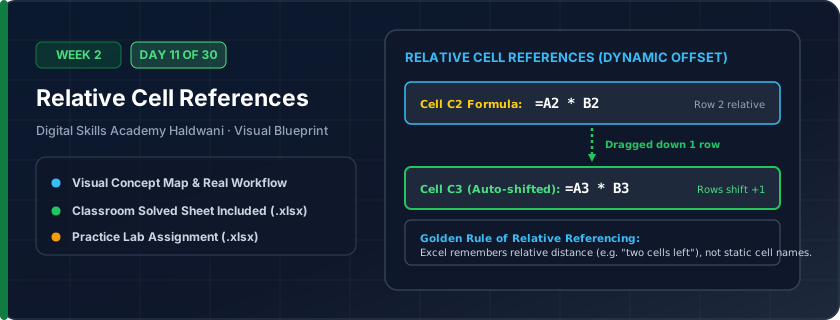
Excel's default copy behavior where formula cell addresses shift relative to where you paste or drag them. If =B2*C2 is dragged down one row, it automatically transforms into =B3*C3.
You only ever have to write a formula once for row 1. Dragging or double-clicking the fill handle replicates the calculation down across 10,000 rows in less than 1 second.
"Relative means 'shifting together' — copy down 1 row, and every row number in your formula increases by 1!"
What You Will Master Today
- What is a Relative Reference? A reference based on relative position, not absolute coordinate
- When copied down 1 row, '=A1*B1' automatically becomes '=A2*B2'
- When copied right 1 column, '=A1*B1' automatically becomes '=B1*C1'
- Auditing relative formulas using 'Show Formulas' shortcut Ctrl + `
Step-by-Step Practical Walkthrough
Write your formula in the first data row: '=B5*C5'.
Double-click the fill handle in the lower-right corner of the cell.
Click on row 8 and check the formula bar: notice it automatically adjusted to '=B8*C8'.
Press Ctrl + ` (grave accent) to toggle Show Formulas mode and see all formulas at once.
Haldwani Kumaon Textiles - Wholesale Fabric Order Billing
Study the completed reference worksheet below. Every column illustrates the standard formatting, formula structure, and alignment applied by professional office operators.
| Fabric Type | Meters Ordered | Rate per Meter (₹) | Item Amount (₹) | GST 5% (₹) | Final Amount (₹) |
|---|---|---|---|---|---|
| Pure Cotton Cambric | 120 | ₹140.00 | ₹16,800.00 | 840 | ₹17,640.00 |
| Pashmina Wool Blend | 45 | ₹650.00 | ₹29,250.00 | 1462.5 | ₹30,712.50 |
| Linen Fabric 60 Lea | 80 | ₹380.00 | ₹30,400.00 | 1520 | ₹31,920.00 |
| Rayon Printed Viscose | 200 | ₹95.00 | ₹19,000.00 | 950 | ₹19,950.00 |
| Silk Chiffon Dupatta Fabric | 60 | ₹260.00 | ₹15,600.00 | 780 | ₹16,380.00 |
Warehouse Daily Dispatch Shipping Sheet
- Task 1: In Column D (Total Weight), write '=B5*C5' and copy down using Ctrl + D.
- Task 2: In Column F (Total Freight), write '=D5*E5' and copy down.
- Task 3: Observe how the cell references adjusted row-by-row without manual edits.
- Task 4: Format the Freight column with ₹ currency.
Exercise Data Template Preview: Download the .xlsx file below and execute each task independently.
| Consignment No | Cartons Shipped | Weight per Carton (Kg) | Total Weight (Kg) | Freight Rate / Kg (₹) | Total Freight (₹) |
|---|---|---|---|---|---|
| CN-7001 | 15 | 12 | ₹18.00 | ||
| CN-7002 | 28 | 8 | ₹18.00 | ||
| CN-7003 | 40 | 15 | ₹18.00 | ||
| CN-7004 | 10 | 22 | ₹18.00 | ||
| CN-7005 | 55 | 6 | ₹18.00 |
Ctrl + D (Fill Down) copies the formula from the cell directly above into all highlighted cells instantly—no mouse dragging required!
Need 1-on-1 Guidance on Day 11?
Join our hands-on classroom lab sessions at Digital Skills Academy in Haldwani. Every student receives a dedicated PC workstation, live instructor reviews, and interview prep.