Mastering Day 15: What, Why & How
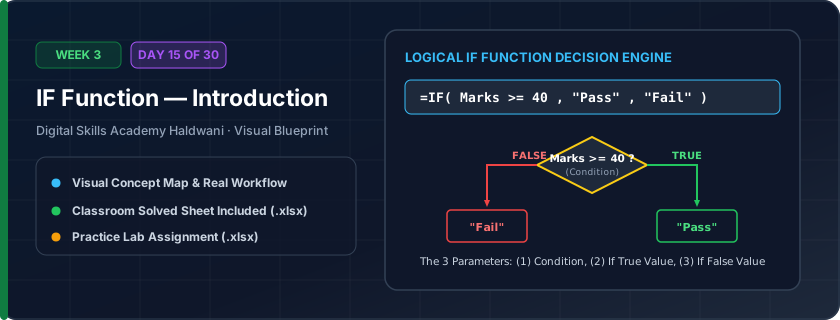
The smart decision-maker of Excel. It evaluates a condition: IF the condition is TRUE it returns one result; IF the condition is FALSE it returns another. Formula: =IF(condition, value_if_true, value_if_false).
Eliminates manual human evaluation. Automatically flags Pass/Fail for student scores, Approved/Rejected for credit, or calculates bonus payouts across thousands of rows instantly.
"IF is a 3-part sentence: 1. Condition, 2. Reward if True, 3. Result if False. Always put words in double quotes!"
What You Will Master Today
- Anatomy of the IF function: Logical Condition, True Outcome, False Outcome
- Relational comparison operators: >, <, >=, <=, =, <>
- Handling text outputs: Always wrap text strings in quotation marks (e.g., "Pass", "Fail")
- Handling numeric outputs: Do NOT wrap numbers in quotes (e.g., 0, 500)
Step-by-Step Practical Walkthrough
Identify your condition: e.g., 'Is Student Marks >= 40?'
Type '=IF(C5>=40, "Pass", "Fail")'.
Press Enter and copy down: any score 40 or higher displays 'Pass', below 40 displays 'Fail'.
Change a score from 35 to 65 and watch the result update from 'Fail' to 'Pass' automatically!
Uttarakhand Board Exam Result Portal - Pass / Fail Automated Validator
Study the completed reference worksheet below. Every column illustrates the standard formatting, formula structure, and alignment applied by professional office operators.
| Roll No | Candidate Name | Total Score (100) | Passing Mark | Result Status | Grade Status |
|---|---|---|---|---|---|
| UK-401 | Rohit Joshi | 78 | 33 | Pass | Qualified |
| UK-402 | Priya Rawat | 29 | 33 | Fail | Needs Improvement |
| UK-403 | Aman Bisht | 85 | 33 | Pass | Qualified |
| UK-404 | Kavita Pandey | 31 | 33 | Fail | Needs Improvement |
| UK-405 | Suresh Negi | 62 | 33 | Pass | Qualified |
E-Commerce Customer Order Dispatch Eligibility
- Task 1: In Column E (Shipping Status), write an IF formula: if Payment Received = 'Yes', return 'Dispatch Order', otherwise 'Hold Payment Pending'.
- Task 2: Formula to write: '=IF(D5="Yes", "Dispatch Order", "Hold Payment Pending")'.
- Task 3: Copy the formula down to all order rows.
- Task 4: Change row 6's payment status to 'Yes' and observe the status flip automatically.
Exercise Data Template Preview: Download the .xlsx file below and execute each task independently.
| Order ID | Customer Name | Order Value (₹) | Payment Received? | Shipping Status |
|---|---|---|---|---|
| ORD-901 | Verma Traders | ₹14,500.00 | Yes | |
| ORD-902 | Kumaon Handlooms | ₹8,200.00 | No | |
| ORD-903 | Haldwani Mart | ₹22,000.00 | Yes | |
| ORD-904 | Pooja Boutique | ₹6,500.00 | No | |
| ORD-905 | Nainital Gifts | ₹11,800.00 | Yes |
Always wrap text strings in quotation marks inside IF statements: "Pass". If you type Pass without quotes, Excel gives a '#NAME?' error searching for a formula named Pass!
Need 1-on-1 Guidance on Day 15?
Join our hands-on classroom lab sessions at Digital Skills Academy in Haldwani. Every student receives a dedicated PC workstation, live instructor reviews, and interview prep.