Mastering Day 2: What, Why & How
The fundamental grammar of spreadsheets: how Excel categorizes what you type. By default, Text automatically aligns to the LEFT, while Numbers, Dates, and Times automatically align to the RIGHT.
If Excel thinks your number is text (e.g., you accidentally typed an apostrophe, space, or manual letter), formulas like SUM will return ₹0 or error out. Entering clean data is the difference between an accurate audit and a disastrous report.
"Words lean LEFT, Numbers lean RIGHT. If a number leans left, Excel thinks it's a word! Press F2 to fix, never re-type."
What You Will Master Today
- Differentiating Text (left-aligned) vs. Numbers (right-aligned) vs. Dates
- Editing cell contents without re-typing using the F2 key or Formula Bar
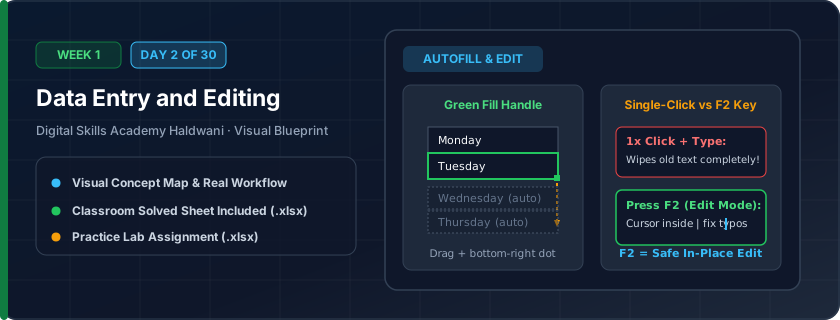
- AutoFill handle: dragging numbers, days, months, and custom linear series
- Flash Fill (Ctrl + E) for automatic pattern detection
Step-by-Step Practical Walkthrough
Enter text labels in Column A and notice Excel automatically aligns text to the left.
Enter numeric values in Column B and verify they automatically align to the right.
Select cell A1, press F2, make modifications, and press Enter to commit.
Type 'Monday' or 'January' and drag the bottom-right fill handle downwards to generate an automatic sequence.
Haldwani Stationery World - Daily Sales Entry Register
Study the completed reference worksheet below. Every column illustrates the standard formatting, formula structure, and alignment applied by professional office operators.
| Serial No | Invoice Date | Customer Name | Item Description | Qty Sold | Amount (₹) |
|---|---|---|---|---|---|
| 1 | 2026-10-01 | Sharma Traders | Spiral Notebook A4 | 15 | ₹900.00 |
| 2 | 2026-10-02 | Nainital Public School | Ball Pen Box (Pack of 50) | 10 | ₹1,800.00 |
| 3 | 2026-10-03 | Kumaon College | A4 Copier Paper Ream | 25 | ₹6,500.00 |
| 4 | 2026-10-04 | Verma Book Depot | Permanent Markers (Set of 4) | 8 | ₹960.00 |
| 5 | 2026-10-05 | Pooja Enterprises | Whiteboard Duster & Stand | 5 | ₹750.00 |
Student Attendance & Roll Call Register
- Task 1: Enter Roll No 101 and 102, then use AutoFill handle to populate up to 110.
- Task 2: Enter Student names in Column B and correct any spelling mistakes using F2.
- Task 3: Use Tab key to move quickly across columns during status entry.
- Task 4: Practice Ctrl + Z (Undo) and Ctrl + Y (Redo) to revert changes.
Exercise Data Template Preview: Download the .xlsx file below and execute each task independently.
| Roll No | Student Name | Class Batch | Day 1 Status | Day 2 Status | Day 3 Status |
|---|---|---|---|---|---|
| 101 | Aarav Rawat | Morning 9 AM | Present | Present | Present |
| 102 | Bhumika Joshi | Morning 9 AM | Present | Absent | Present |
| 103 | Chetan Bisht | Morning 9 AM | Absent | Present | Present |
| 104 | Divya Arya | Morning 9 AM | Present | Present | Present |
| 105 | Eshan Pandey | Morning 9 AM | Present | Present | Absent |
Double-clicking the green fill handle in the corner of a cell automatically fills down to match adjacent rows!
Need 1-on-1 Guidance on Day 2?
Join our hands-on classroom lab sessions at Digital Skills Academy in Haldwani. Every student receives a dedicated PC workstation, live instructor reviews, and interview prep.