Mastering Day 3: What, Why & How
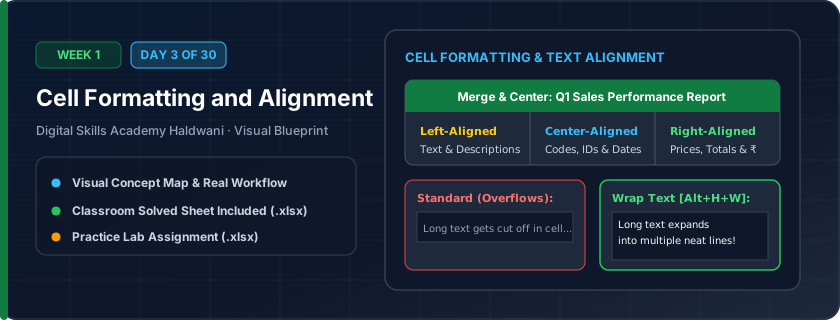
The visual styling of your worksheet — fonts, sizes, fill colors, borders, and text alignment. Think of formatting as putting on a professional corporate suit for your raw numbers.
Raw, unformatted spreadsheets look messy, confuse managers, and lead to costly reading mistakes. Clean formatting guides the reader's eyes directly to key headings, categories, and bottom-line totals.
"Dark headers with crisp white bold text on top, clear borders in the middle, and double-underlines on total rows at the bottom."
What You Will Master Today
- Font styling: typeface, sizing, bold, italic, and underline
- Fill colors and cell border styles (Thin, Thick outside, Double underline)
- Alignment controls: Top, Middle, Bottom, Left, Center, Right
- Wrap Text for long column descriptions and Merge & Center for table banners
Step-by-Step Practical Walkthrough
Select table title row and click Merge & Center to span across table columns.
Apply a Navy fill background (`#0D2137`) with Bold White text for headers.
Select data cells and apply 'All Borders' to create clear tabular lines.
Select columns with long text, click 'Wrap Text', and adjust row height.
Kumaon Sweets & Restaurant Haldwani - Price Menu Card
Study the completed reference worksheet below. Every column illustrates the standard formatting, formula structure, and alignment applied by professional office operators.
| Item Code | Product Category | Delicacy Description | Serving Unit | Price (₹) |
|---|---|---|---|---|
| SWT-01 | Traditional Mithai | Bal Mithai (Pure Khoya with Sugar Balls) | 1 Kg Box | ₹480.00 |
| SWT-02 | Traditional Mithai | Singodi (Condensed Milk wrapped in Malu leaf) | 1 Kg Box | ₹520.00 |
| SWT-03 | Milk Sweets | Kaju Katli Special Silver Vark | 1 Kg Box | ₹950.00 |
| SWT-04 | Snacks & Namkeen | Kumaoni Singal & Chutney Platter | Per Plate | ₹120.00 |
| SWT-05 | Beverages | Badam Kesar Milk Kulhad | Per Glass | ₹70.00 |
Hotel Mountain View Haldwani - Room Tariff Card
- Task 1: Merge & Center row 2 across columns A to E for the title 'HOTEL MOUNTAIN VIEW TARIFF CARD'.
- Task 2: Apply Dark Navy fill with White text to the table headers in row 4.
- Task 3: Enable 'Wrap Text' on Column C (Amenities) so all text wraps cleanly within the cell.
- Task 4: Apply thin light-gray cell borders across all data rows.
Exercise Data Template Preview: Download the .xlsx file below and execute each task independently.
| Room No | Room Type | Amenities & Inclusions | Max Guests | Nightly Tariff (₹) |
|---|---|---|---|---|
| 101 | Deluxe AC Room | King Bed, Mountain View Balcony, High-speed Wi-Fi, Breakfast | 2 | 2800 |
| 102 | Executive Suite | Living Room, Mini Bar, Jacuzzi Bath, All Meals Included | 3 | 4500 |
| 103 | Standard Non-AC | Twin Beds, Attached Bath, Fan, Room Service | 2 | 1600 |
| 104 | Family Quad Room | Two Queen Beds, Smart TV, Free Parking, Mountain Facing | 4 | 3800 |
Avoid over-merging cells inside data tables as it can break sorting and formulas. Use 'Center Across Selection' in Format Cells dialog as a safer alternative!
Need 1-on-1 Guidance on Day 3?
Join our hands-on classroom lab sessions at Digital Skills Academy in Haldwani. Every student receives a dedicated PC workstation, live instructor reviews, and interview prep.