Mastering Day 25: What, Why & How
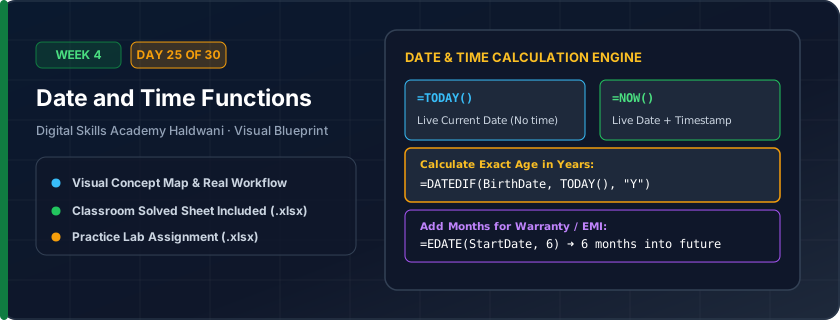
Calendar formulas that compute dates and time intervals: =TODAY() returns the current date, =NOW() returns current date and time, and =DATEDIF() calculates exact age or elapsed days between dates.
Tracking overdue invoices, calculating employee service tenure, computing loan aging, and tracking project countdowns dynamically without updating files daily.
"Excel stores dates as numbers (Day 1 was Jan 1, 1900)! Subtract dates to find elapsed days; use =TODAY() for living, dynamic deadlines."
What You Will Master Today
- How Excel handles dates: Dates are serial integers starting from January 1, 1900
- =TODAY() returns the dynamic current date; =NOW() returns current date and time
- =YEAR(date), =MONTH(date), =DAY(date) to extract component calendar integers
- Calculating days between dates: '=EndDate - StartDate'
- =DATEDIF(StartDate, EndDate, "Y") to calculate exact completed age in years or tenure
Step-by-Step Practical Walkthrough
Type '=TODAY()' in a cell to display today's dynamic system date.
To calculate service tenure in years, write '=DATEDIF(JoiningDate, TODAY(), "Y")'.
To calculate employee age in months, write '=DATEDIF(DOB, TODAY(), "M")'.
Press Ctrl + ; to insert a static snapshot of today's date that will not change tomorrow.
Haldwani Corporate HR - Employee Gratuity & Service Tenure Calculator
Study the completed reference worksheet below. Every column illustrates the standard formatting, formula structure, and alignment applied by professional office operators.
| Emp ID | Employee Name | Joining Date | Today's Date (=TODAY()) | Completed Years (=DATEDIF) | Gratuity Eligible? (>=5 Yrs) |
|---|---|---|---|---|---|
| EMP-101 | Rahul Joshi | 2018-04-15 | 2026-10-04 | 8 | Eligible for Gratuity |
| EMP-102 | Pooja Bisht | 2022-07-01 | 2026-10-04 | 4 | Not Eligible (Need 5 Yrs) |
| EMP-103 | Deepak Rawat | 2015-11-20 | 2026-10-04 | 10 | Eligible for Gratuity |
| EMP-104 | Sneha Arya | 2024-01-10 | 2026-10-04 | 2 | Not Eligible (Need 5 Yrs) |
| EMP-105 | Amit Negi | 2019-09-05 | 2026-10-04 | 7 | Eligible for Gratuity |
Library Book Issue & Overdue Fine Management System
- Task 1: In Column D, calculate Due Date by adding 14 days to Issue Date: '=C5+14'.
- Task 2: In Column F, calculate Overdue Days using '=MAX(0, E5-D5)'.
- Task 3: In Column G, calculate Fine Payable by multiplying Overdue Days by ₹5 per day: '=F5*5'.
- Task 4: Format all date columns as DD-MM-YYYY and fine column as Currency ₹.
Exercise Data Template Preview: Download the .xlsx file below and execute each task independently.
| Book ID | Student Name | Issue Date | Return Due Date (+14 Days) | Actual Return Date | Overdue Days | Fine Payable (₹5/Day) |
|---|---|---|---|---|---|---|
| BK-501 | Aman Joshi | 2026-09-01 | 2026-09-20 | |||
| BK-502 | Bhumika Rawat | 2026-09-05 | 2026-09-15 | |||
| BK-503 | Chandan Negi | 2026-09-10 | 2026-10-02 | |||
| BK-504 | Deepika Arya | 2026-09-15 | 2026-09-25 |
=DATEDIF is an undocumented secret function in Excel! It won't show in autocomplete tooltips, but it works reliably: "Y" for years, "M" for months, "D" for days.
Need 1-on-1 Guidance on Day 25?
Join our hands-on classroom lab sessions at Digital Skills Academy in Haldwani. Every student receives a dedicated PC workstation, live instructor reviews, and interview prep.