Mastering Day 8: What, Why & How
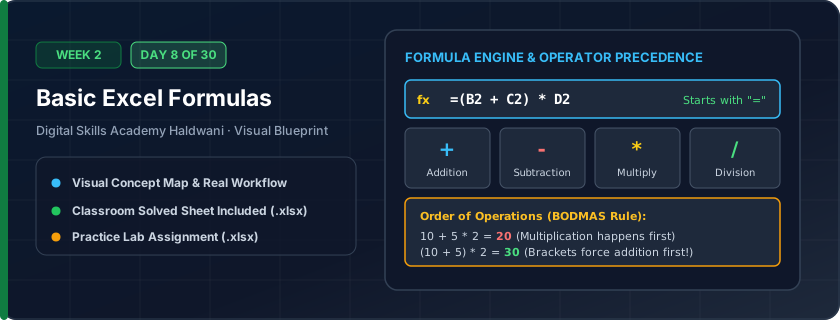
Mathematical instructions written into cells using basic arithmetic operators: Addition (+), Subtraction (-), Multiplication (*), and Division (/).
Formulas turn static tables into dynamic calculators. If prices or unit quantities change next week, profit margins and invoice totals update immediately without manual recalculation.
"Every formula starts with '='! Never hardcode numbers — always point to cell addresses so math stays dynamic."
What You Will Master Today
- Every Excel formula MUST begin with an equals sign (=)
- Arithmetic operators: Addition (+), Subtraction (-), Multiplication (*), Division (/)
- Mathematical Order of Operations (BODMAS: Brackets, Orders, Division/Multiplication, Addition/Subtraction)
- Referencing cell coordinates instead of hardcoding static numbers
Step-by-Step Practical Walkthrough
Select cell C5 and type '=' to instruct Excel that a mathematical calculation is beginning.
Click cell A5, type '*', and click cell B5 to create the formula '=A5*B5'.
Press Enter to view the computed answer; observe the formula remains visible in the Formula Bar.
Copy the formula down using the fill handle to compute answers for all rows.
Haldwani Hardware Mart - Building Materials Purchase Order
Study the completed reference worksheet below. Every column illustrates the standard formatting, formula structure, and alignment applied by professional office operators.
| Material Item | Quantity Ordered | Unit Rate (₹) | Gross Amount (₹) | Trade Discount (₹) | Net Payable (₹) |
|---|---|---|---|---|---|
| ACC Cement Bags (50kg) | 150 | ₹380.00 | ₹57,000.00 | 1500 | ₹55,500.00 |
| TMT Steel Bars 12mm (Bundle) | 40 | ₹2,450.00 | ₹98,000.00 | 2000 | ₹96,000.00 |
| River Sand (Truck Load) | 3 | ₹14,000.00 | ₹42,000.00 | 1000 | ₹41,000.00 |
| Red Clay Bricks (1000 Pcs) | 8 | ₹7,500.00 | ₹60,000.00 | 1200 | ₹58,800.00 |
| Gravel Stone Coarse | 4 | ₹8,500.00 | ₹34,000.00 | 800 | ₹33,200.00 |
Construction Quotation Estimation Sheet
- Task 1: In Column D (Subtotal), enter formula '=B5*C5' to calculate units multiplied by rate.
- Task 2: In Column E (GST 18%), calculate GST using '=D5*0.18'.
- Task 3: In Column F (Total Cost), add subtotal and tax using '=D5+E5'.
- Task 4: Copy the formulas down to row 9 and format all money columns with ₹ currency.
Exercise Data Template Preview: Download the .xlsx file below and execute each task independently.
| Cost Head | Units / Hours | Rate per Unit (₹) | Subtotal (₹) | GST 18% (₹) | Total Cost (₹) |
|---|---|---|---|---|---|
| Masonry Skilled Labor | 120 | ₹650.00 | |||
| Helper Unskilled Labor | 180 | ₹450.00 | |||
| Plumbing Installation Package | 1 | ₹35,000.00 | |||
| Electrical Wiring & Conduit | 1 | ₹48,000.00 | |||
| Interior Paint & Primer | 25 | ₹1,400.00 |
Never type '=B5*C5+E5*D5' without understanding operator precedence. Use parentheses '=(B5*C5)+(E5*D5)' to guarantee correct order of operations!
Need 1-on-1 Guidance on Day 8?
Join our hands-on classroom lab sessions at Digital Skills Academy in Haldwani. Every student receives a dedicated PC workstation, live instructor reviews, and interview prep.