Mastering Day 13: What, Why & How
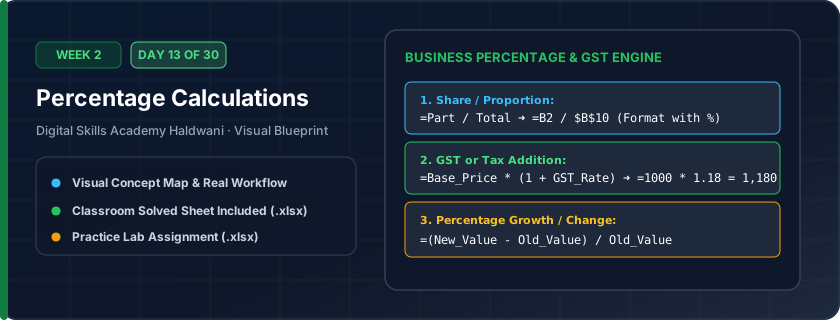
Calculating fractional portions expressed out of 100: Percentage of Total (=Part / Total), Percentage Growth/Change (=(New - Old) / Old), GST markup addition, and Discount subtractions.
Every business decision is evaluated in percentages — profit margins, revenue growth, sales targets achieved, discount reductions, and tax deductions.
"Percentage is always 'Part divided by Whole' (=Part/Total). Remember to anchor the Grand Total cell with $!"
What You Will Master Today
- Understanding percentage math: 15% is internally stored as decimal 0.15
- Calculating Discount: Price * Discount %
- Calculating Profit Margin: (Selling Price - Cost Price) / Cost Price
- Calculating Percentage of Grand Total: Part / Whole ($B$Total)
- Percentage Increase / Growth: (New - Old) / Old
Step-by-Step Practical Walkthrough
To calculate margin %, write '=(Selling - Cost) / Cost'.
To calculate share of total revenue, divide branch revenue by locked grand total '=B5/$B$15'.
Select the answer cells and press Ctrl + Shift + % to convert 0.245 into 24.5%.
Add 1 or 2 decimals using the Increase Decimal button.
Haldwani Cloth Market - Festive Seasonal Sales & Margin Sheet
Study the completed reference worksheet below. Every column illustrates the standard formatting, formula structure, and alignment applied by professional office operators.
| Garment Category | Cost Price (₹) | Selling Price (₹) | Gross Profit (₹) | Profit Margin % | Revenue Share % |
|---|---|---|---|---|---|
| Men's Formal Suits | ₹3,200.00 | ₹5,400.00 | 2200 | 68.8% | 28.4% |
| Women's Designer Sarees | ₹1,800.00 | ₹3,600.00 | 1800 | 1.0 | 37.9% |
| Kids Festive Wear | ₹650.00 | ₹1,200.00 | 550 | 84.6% | 12.6% |
| Winter Jackets & Shawls | ₹1,100.00 | ₹2,000.00 | 900 | 81.8% | 21.1% |
Annual Sales Growth Rate Comparison
- Task 1: In Column D (Net Growth), calculate Year 2026 minus Year 2025 using '=C5-B5'.
- Task 2: In Column E (Growth Rate %), calculate percentage growth using '=(C5-B5)/B5'.
- Task 3: Format Column E as Percentage with 1 decimal place (Ctrl + Shift + %).
- Task 4: Calculate the Grand Total row at the bottom and compute the overall business growth %.
Exercise Data Template Preview: Download the .xlsx file below and execute each task independently.
| Product Category | Year 2025 Sales (₹) | Year 2026 Sales (₹) | Net Growth (₹) | Growth Rate % | Target Met? |
|---|---|---|---|---|---|
| Laptops & PC | 2400000 | 2850000 | |||
| Smartphones | 4500000 | 5175000 | |||
| Tablets & iPads | 850000 | 920000 | |||
| Accessories & Cables | 380000 | 490000 |
Never multiply by 100 in Excel percentages! Just write '=Part/Whole' and format the cell as Percentage (%). Excel automatically multiplies by 100 for display.
Need 1-on-1 Guidance on Day 13?
Join our hands-on classroom lab sessions at Digital Skills Academy in Haldwani. Every student receives a dedicated PC workstation, live instructor reviews, and interview prep.