Mastering Day 14: What, Why & How
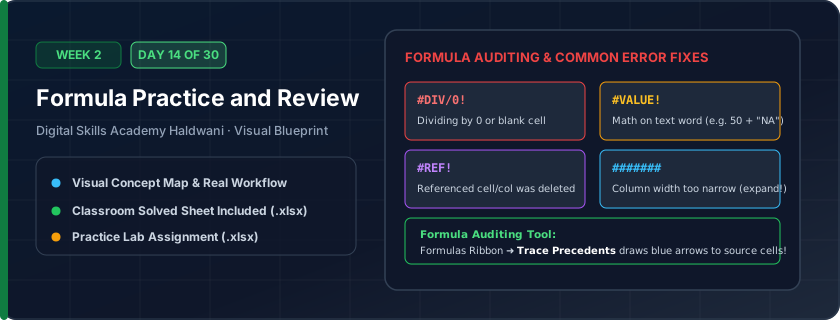
Auditing, tracing, and resolving formula errors: #DIV/0! (dividing by zero or blank), #VALUE! (trying to do math on words), #NAME? (misspelled function name), and #REF! (deleted cell).
Errors in client or management reports destroy credibility and can lead to financial losses. Knowing how to trace precedents and handle errors makes you a reliable, bulletproof analyst.
"Colors show sources; blue arrows trace history; #REF! means you deleted a cell your formula needed; IFERROR cleans up mistakes."
What You Will Master Today
- End-to-end integration of SUM, AVERAGE, MIN, MAX, and Percentage formulas
- Combining locked parameters ($) with relative row calculations
- Error troubleshooting: resolving #DIV/0!, #VALUE!, and circular reference warnings
- Building robust templates that update instantly when raw numbers change
Step-by-Step Practical Walkthrough
Open the Week 2 Capstone Workbook.
Verify all formulas reference dynamic coordinates and contain zero hardcoded answers.
Audit calculation flow using the Formula Auditing toolbar (Formulas > Trace Precedents).
Complete both Tab 1 (Automated Marksheet) and Tab 2 (GST Invoice).
Kumaon Public School Haldwani - Term-End Automated Marksheet (Solved)
Study the completed reference worksheet below. Every column illustrates the standard formatting, formula structure, and alignment applied by professional office operators.
| Roll No | Student Name | Physics | Chemistry | Maths | English | CS | Total (500) | Percentage % |
|---|---|---|---|---|---|---|---|---|
| 101 | Aarav Rawat | 88 | 85 | 94 | 82 | 96 | 445 | 89.0% |
| 102 | Bhumika Joshi | 92 | 90 | 96 | 88 | 98 | 464 | 92.8% |
| 103 | Chetan Negi | 74 | 68 | 70 | 75 | 82 | 369 | 73.8% |
| 104 | Deepak Arya | 62 | 65 | 58 | 64 | 70 | 319 | 63.8% |
| 105 | Ekta Bisht | 95 | 92 | 98 | 90 | 95 | 470 | 94.0% |
Week 2 Formula Mastery Capstone Challenge (Unsolved)
- Task 1: Calculate Amount using '=C5*D5'.
- Task 2: Calculate Discount Amount by multiplying Amount by locked cell $F$2.
- Task 3: Calculate Taxable Value using '=Amount - Disc Amount'.
- Task 4: Add 18% GST using '=Taxable * 1.18' to obtain Final Total.
- Task 5: Add a Grand Total row at the bottom using Alt + = AutoSum.
Exercise Data Template Preview: Download the .xlsx file below and execute each task independently.
| Item ID | Description | Qty | Rate (₹) | Amount (₹) | Discount % [Locked $E$2] | Disc Amount (₹) | Taxable (₹) | Final Total (₹) |
|---|---|---|---|---|---|---|---|---|
| ITM-01 | Ergonomic Office Chair | 12 | ₹6,500.00 | 5.0% | ||||
| ITM-02 | Modular Computer Desk | 6 | ₹12,500.00 | 5.0% | ||||
| ITM-03 | 4-Drawer File Cabinet | 4 | ₹8,200.00 | 5.0% | ||||
| ITM-04 | Conference Room Table | 1 | ₹38,000.00 | 5.0% | ||||
| ITM-05 | Whiteboard 6x4 Feet | 3 | ₹2,800.00 | 5.0% |
Press Ctrl + ` (the key above Tab) anytime to switch between viewing formula results and viewing formula text across the entire sheet!
Need 1-on-1 Guidance on Day 14?
Join our hands-on classroom lab sessions at Digital Skills Academy in Haldwani. Every student receives a dedicated PC workstation, live instructor reviews, and interview prep.