Mastering Day 6: What, Why & How
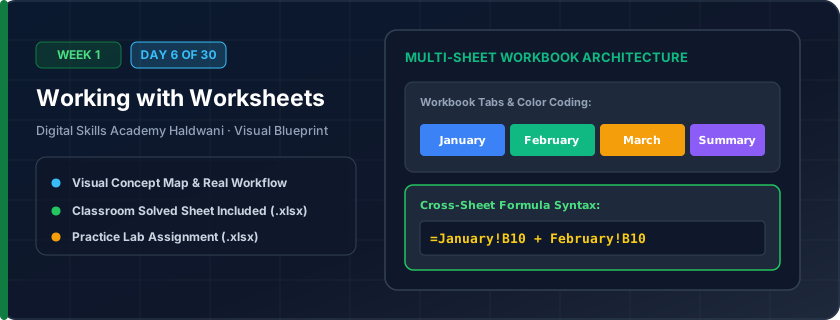
Organizing multiple tabbed pages inside a single workbook file. Think of the workbook as a physical binder folder and each worksheet as a separate labeled divider page (e.g., Jan, Feb, Mar, Annual Summary).
Instead of cluttering your computer with 12 separate monthly files, worksheets keep all related business data consolidated in one central workbook where formulas can reference across tabs seamlessly.
"Hold Ctrl and drag any sheet tab to duplicate it in 1 second; color-code your tabs so you can navigate at a glance."
What You Will Master Today
- Workbook architecture with multiple independent worksheet tabs
- Renaming sheet tabs clearly (e.g., Q1_Sales, Q2_Sales, Master_Summary)
- Applying tab colors for visual status tracking (Green = Done, Red = Pending)
- Move or Copy sheet functionality to duplicate complex templates without breaking formulas
Step-by-Step Practical Walkthrough
Click the '+' button next to sheet tabs to insert a new blank worksheet.
Double-click a sheet tab or right-click > 'Rename' to give it a descriptive title.
Right-click a sheet tab > 'Tab Color' to assign an organized color theme.
Hold Ctrl and drag a sheet tab to the right to duplicate it instantly!
Haldwani Retail Chains - 4-Quarter Revenue Tracking Workbook
Study the completed reference worksheet below. Every column illustrates the standard formatting, formula structure, and alignment applied by professional office operators.
| Store Branch | Quarter | Target Revenue (₹) | Achieved Revenue (₹) | Status |
|---|---|---|---|---|
| Nainital Road Branch | Q1 (Apr-Jun) | 1500000 | 1620000 | Achieved |
| Kaladhungi Road Branch | Q1 (Apr-Jun) | 1200000 | 1150000 | Near Target |
| Mukhani Chauraha Branch | Q1 (Apr-Jun) | 1800000 | 1950000 | Achieved |
| Bareilly Road Branch | Q1 (Apr-Jun) | 1000000 | 1080000 | Achieved |
Multi-Month School Academic Fee Register
- Task 1: Rename the active worksheet to 'April_2026' and set Tab Color to Forest Green.
- Task 2: Duplicate 'April_2026' using Ctrl + Drag and rename the new copy to 'May_2026'.
- Task 3: Create a third sheet named 'Annual_Summary' and move it to the first position.
- Task 4: Use Ctrl + Page Down and Ctrl + Page Up to navigate between worksheets without using the mouse.
Exercise Data Template Preview: Download the .xlsx file below and execute each task independently.
| Student ID | Student Name | Class Grade | Tuition Fee (₹) | Transport Fee (₹) | Payment Status |
|---|---|---|---|---|---|
| STU-501 | Aryan Joshi | Grade 8 | ₹3,500.00 | ₹1,200.00 | Paid |
| STU-502 | Bhavna Pandey | Grade 8 | ₹3,500.00 | ₹1,200.00 | Paid |
| STU-503 | Chirag Rawat | Grade 8 | ₹3,500.00 | ₹1,200.00 | Pending |
| STU-504 | Deepali Bisht | Grade 8 | ₹3,500.00 | ₹1,200.00 | Paid |
You can select multiple sheets simultaneously by holding Shift or Ctrl while clicking tabs. Any formatting or header changes you make will apply to all selected sheets at once!
Need 1-on-1 Guidance on Day 6?
Join our hands-on classroom lab sessions at Digital Skills Academy in Haldwani. Every student receives a dedicated PC workstation, live instructor reviews, and interview prep.