Mastering Day 9: What, Why & How
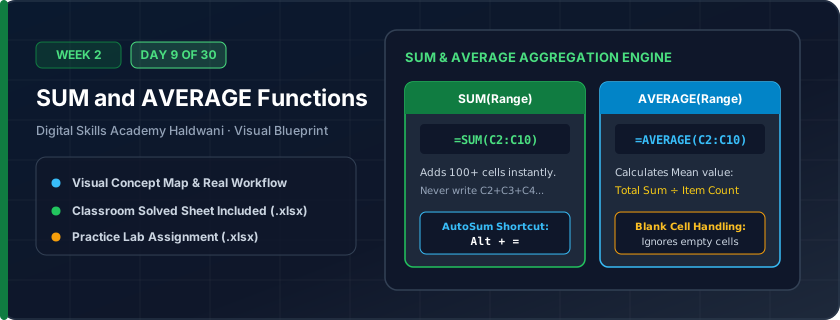
Excel's two most essential built-in mathematical functions: =SUM(range) adds all numbers in a group, and =AVERAGE(range) calculates the statistical mean (Total Sum ÷ Count).
Writing =A1+A2+A3...+A100 takes minutes, is exhausting, and breaks if you insert a row. =SUM(A1:A100) takes 2 seconds and automatically expands if you insert rows inside the range.
"Alt + = is your magic AutoSum wand! Remember: a colon (:) means 'THROUGH', while a comma (,) means 'AND'."
What You Will Master Today
- Function anatomy: Function Name + Open Parenthesis + Arguments + Close Parenthesis
- =SUM(A1:A10) to aggregate thousands of numbers in a single millisecond
- =AVERAGE(A1:A10) to compute arithmetic mean while ignoring blank cells
- AutoSum ribbon button and keyboard shortcut Alt + =
Step-by-Step Practical Walkthrough
Select the empty cell directly beneath a column of numeric values.
Press Alt + = on your keyboard; Excel will automatically insert '=SUM(...)' with the guessed range.
Press Enter to confirm.
To calculate average, type '=AVERAGE(' and drag your mouse across the data range.
Digital Skills Academy Haldwani - Monthly Center Utility Expenses
Study the completed reference worksheet below. Every column illustrates the standard formatting, formula structure, and alignment applied by professional office operators.
| Expense Month | Electricity Bill (₹) | High-Speed Internet (₹) | Office Housekeeping (₹) | Total Utilities (₹) |
|---|---|---|---|---|
| April 2026 | 4850 | 1999 | 3500 | 10349 |
| May 2026 | 6200 | 1999 | 3500 | 11699 |
| June 2026 | 7400 | 1999 | 3500 | 12899 |
| July 2026 | 6900 | 1999 | 3500 | 12399 |
| August 2026 | 5800 | 1999 | 3500 | 11299 |
| September 2026 | 5100 | 1999 | 3500 | 10599 |
Student Academic Term Exam Scorecard
- Task 1: In Column G (Total Marks), use '=SUM(C5:F5)' to calculate the aggregate marks for each student.
- Task 2: In Column H (Average %), use '=AVERAGE(C5:F5)' to compute the percentage score.
- Task 3: At the bottom in row 10, calculate the Class Average for each subject using AutoSum.
- Task 4: Format the Average column to show 1 decimal place.
Exercise Data Template Preview: Download the .xlsx file below and execute each task independently.
| Roll No | Student Name | Mathematics | Science | English | Computer Apps | Total Marks | Average % |
|---|---|---|---|---|---|---|---|
| 101 | Aditya Sharma | 88 | 92 | 79 | 95 | ||
| 102 | Bhavna Joshi | 94 | 89 | 85 | 98 | ||
| 103 | Chetan Negi | 72 | 68 | 74 | 80 | ||
| 104 | Deepak Rawat | 65 | 70 | 68 | 75 | ||
| 105 | Ekta Bisht | 91 | 95 | 88 | 96 |
=AVERAGE ignores completely empty cells, but it DOES count cells containing zero (0). Ensure unattempted exams are blank or zero according to your policy!
Need 1-on-1 Guidance on Day 9?
Join our hands-on classroom lab sessions at Digital Skills Academy in Haldwani. Every student receives a dedicated PC workstation, live instructor reviews, and interview prep.