Mastering Day 5: What, Why & How
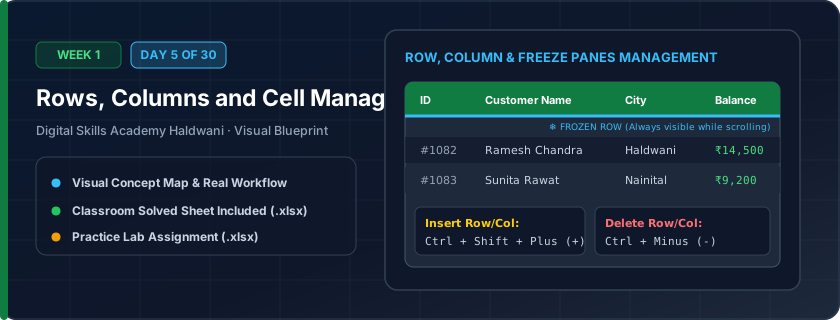
Controlling the physical grid structure — inserting or deleting rows and columns, adjusting column widths, hiding sensitive data, and locking table headers so they never scroll away.
When scrolling down a 1,000-row sales report, your column titles vanish off the screen, leaving you lost. Freezing Panes locks your header row permanently in place so you always know what each column means.
"Freeze Top Row so headers never scroll away; double-click the column boundary to instantly kill '###' overflow errors."
What You Will Master Today
- Inserting and deleting individual cells, entire rows, and columns
- AutoFit column width and row height using mouse double-click shortcuts
- Hiding and unhiding columns (e.g., wholesale prices or passwords)
- Freeze Panes: Keeping header rows visible while scrolling down large datasets
Step-by-Step Practical Walkthrough
Select row header number, right-click, and choose 'Insert' to add a blank row above.
Double-click the border between Column headers to automatically fit the longest text.
Right-click a column letter and select 'Hide'; select adjacent columns and click 'Unhide' to reveal.
Go to View tab > Freeze Panes > Freeze Top Row to lock headers while scrolling.
Haldwani City Hospital - Central Pharmacy Medicine Inventory
Study the completed reference worksheet below. Every column illustrates the standard formatting, formula structure, and alignment applied by professional office operators.
| Batch ID | Medicine Name | Manufacturer | Wholesale Cost (₹) [Hidden] | Retail MRP (₹) | Stock Units | Expiry Date |
|---|---|---|---|---|---|---|
| BAT-101 | Paracetamol 650mg Tabs | Cipla Pharma | ₹18.50 | 32.0 | 500 | 2028-06-30 |
| BAT-102 | Azithromycin 500mg | Sun Pharma | ₹75.00 | 125.0 | 200 | 2027-12-31 |
| BAT-103 | Pantoprazole 40mg DSR | Alkem Labs | ₹68.00 | 110.0 | 350 | 2028-03-31 |
| BAT-104 | Cetirizine 10mg Tabs | Dr. Reddy's | ₹12.00 | 25.0 | 450 | 2029-01-31 |
| BAT-105 | Amoxicillin Clavulanate | Mankind Pharma | ₹110.00 | 185.0 | 150 | 2027-09-30 |
Automobile Spare Parts Master Catalog
- Task 1: Freeze row 4 using View > Freeze Panes so headers stay fixed during scrolling.
- Task 2: Hide Column D (Distributor Price) to prepare a customer-facing printout.
- Task 3: Insert a new column between Part Description and Vehicle Compatibility titled 'Category'.
- Task 4: AutoFit all column widths by selecting the whole sheet (Ctrl + A) and double-clicking any column separator.
Exercise Data Template Preview: Download the .xlsx file below and execute each task independently.
| Part Number | Part Description | Vehicle Compatibility | Distributor Price | Customer MRP | Quantity Available |
|---|---|---|---|---|---|
| PRT-901 | Front Brake Pad Set | Maruti Swift / Dzire | ₹650.00 | 1150 | 24 |
| PRT-902 | Engine Oil Filter 5W30 | Hyundai i20 / Creta | ₹180.00 | 380 | 50 |
| PRT-903 | Clutch Plate Assembly | Tata Nexon / Tiago | ₹1,850.00 | 3200 | 12 |
| PRT-904 | Spark Plug Platinum | Honda City / Amaze | ₹220.00 | 450 | 36 |
| PRT-905 | Cabin AC Filter Carbon | Universal Models | ₹140.00 | 320 | 40 |
To unhide Column A, click the top-left sheet corner square (Select All) and right-click any column header to select 'Unhide'!
Need 1-on-1 Guidance on Day 5?
Join our hands-on classroom lab sessions at Digital Skills Academy in Haldwani. Every student receives a dedicated PC workstation, live instructor reviews, and interview prep.